> ## Documentation Index
> Fetch the complete documentation index at: https://docs.fitup.health/llms.txt
> Use this file to discover all available pages before exploring further.
# การเปลี่ยนสถานะ Lead เป็น Prospect ในระบบจัดการฟิตเนส (Change Status Lead to Prospect)
> เปลี่ยนสถานะลูกค้าเป้าหมายจาก Lead เป็น Prospect เมื่อลูกค้าแสดงความสนใจซื้อแพ็กเกจในระบบบริหารจัดการฟิตเนส
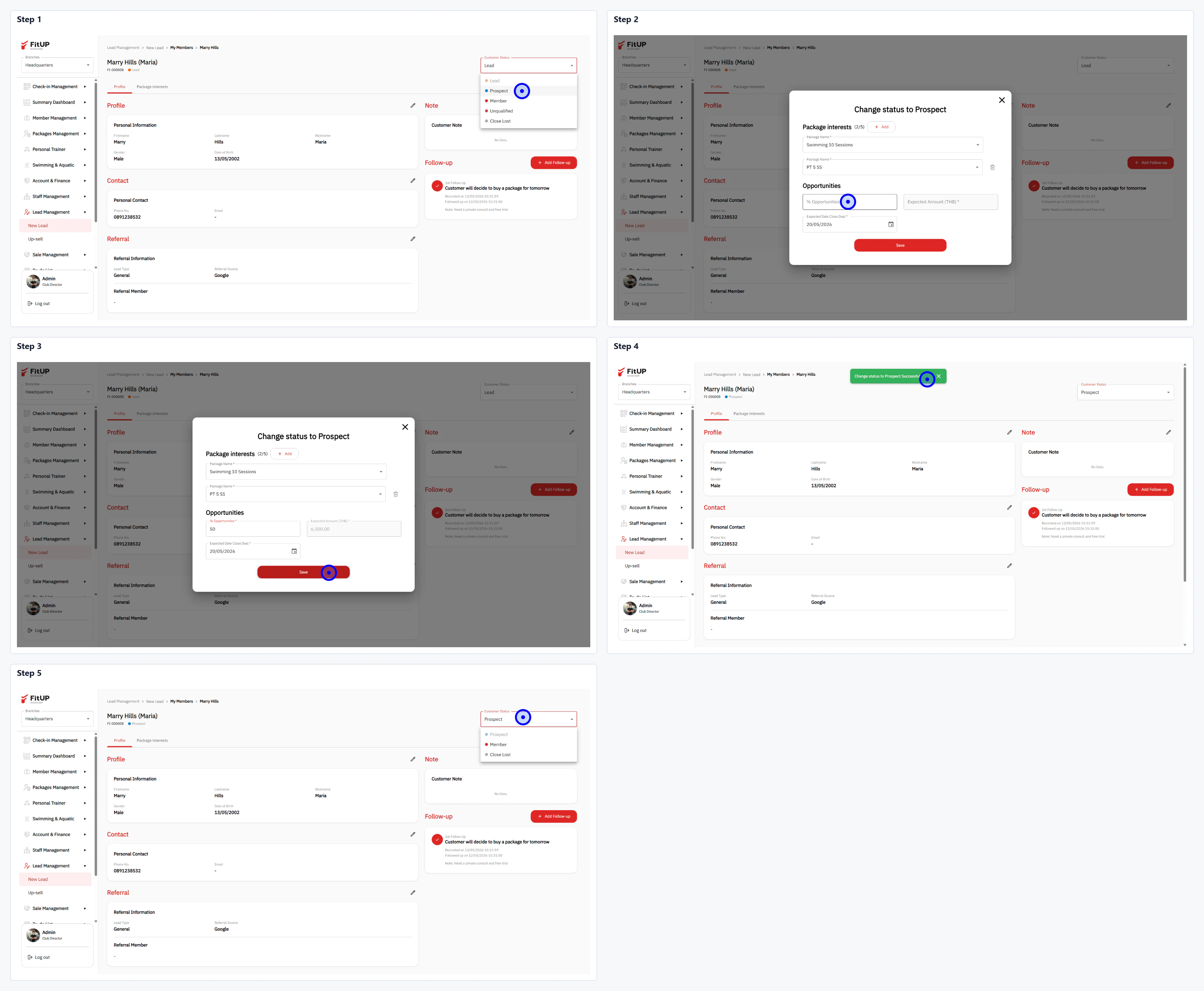 * คลิกชื่อ Lead จากรายการ **New Lead** เพื่อเปิดโปรไฟล์
* คลิก Dropdown สถานะและเลือก **Prospect**
* ตรวจสอบ **Package Interests** ที่ Lead สนใจ
* กรอกมูลค่าโอกาสในส่วน **Opportunities** ได้แก่ จำนวนเงิน วันที่คาดปิดการขาย และหมายเหตุ
* คลิก **Save** เพื่อยืนยัน ระบบจะเปลี่ยนสถานะเป็น **Prospect** ทันที
* คลิกชื่อ Lead จากรายการ **New Lead** เพื่อเปิดโปรไฟล์
* คลิก Dropdown สถานะและเลือก **Prospect**
* ตรวจสอบ **Package Interests** ที่ Lead สนใจ
* กรอกมูลค่าโอกาสในส่วน **Opportunities** ได้แก่ จำนวนเงิน วันที่คาดปิดการขาย และหมายเหตุ
* คลิก **Save** เพื่อยืนยัน ระบบจะเปลี่ยนสถานะเป็น **Prospect** ทันที