> ## Documentation Index
> Fetch the complete documentation index at: https://docs.fitup.health/llms.txt
> Use this file to discover all available pages before exploring further.
# การเพิ่มตารางว่ายน้ำแบบประจำ (Add Recurring Schedule)
> สร้างตารางการสอนว่ายน้ำแบบ Recurring ที่ทำซ้ำทุกสัปดาห์ในระบบบริหารจัดการฟิตเนส
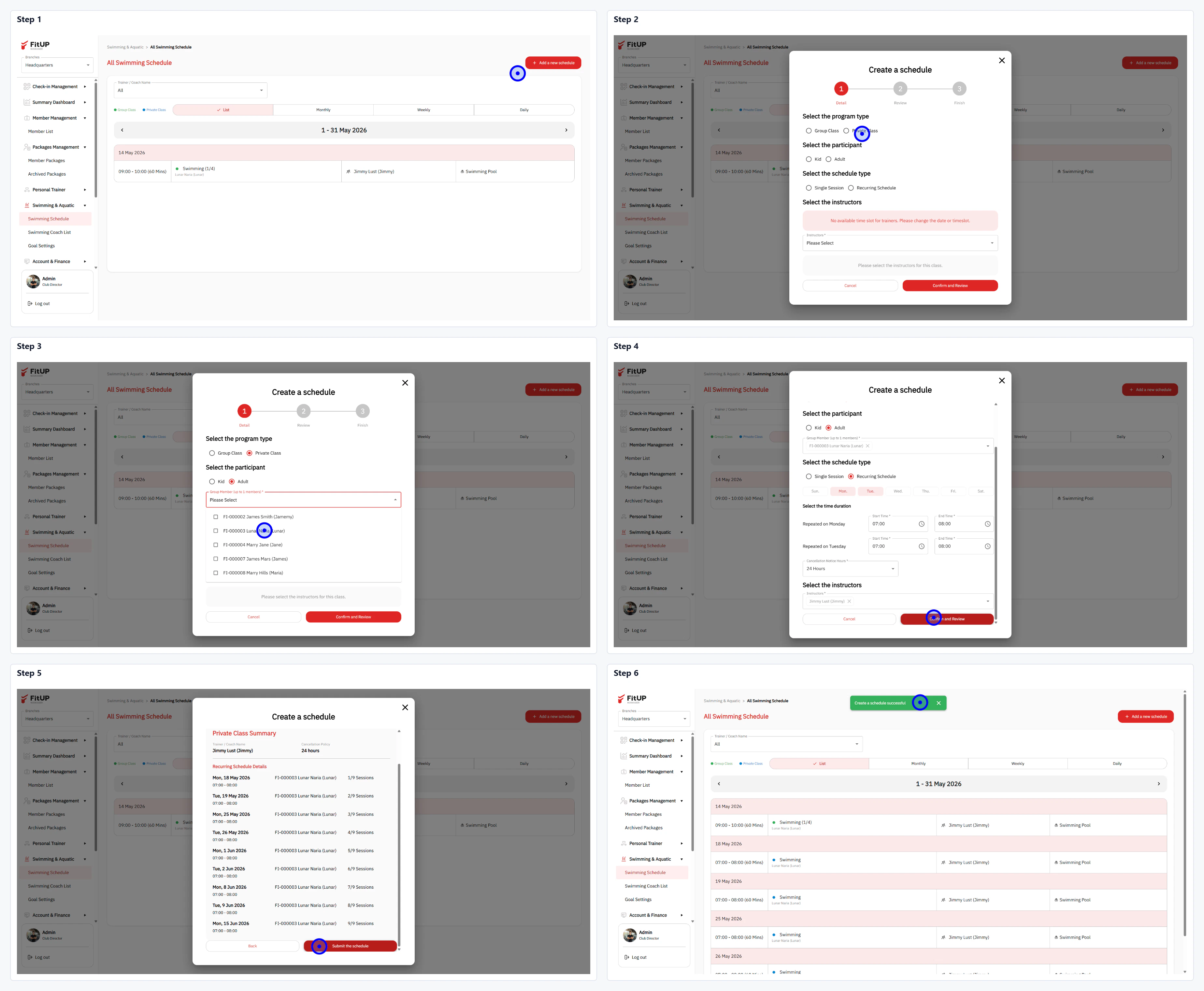 * คลิกเมนู **Swimming & Aquatic** จากนั้นเลือก **Swimming Schedule**
* คลิกปุ่ม **+ Add a new schedule** ที่มุมขวาบน
* **Select the program type**: เลือก **Recurring**
* **Select the participant**: ค้นหาและเลือกสมาชิกจาก Dropdown (รองรับหลายคน)
* **Select the schedule type**: เลือก **Recurring** จากนั้นเลือกวันในสัปดาห์ (เช่น Monday, Wednesday) กำหนดเวลา และช่วง Period
* **Select the instructor**: เลือกโค้ชที่รับผิดชอบ ระบบจะแสดงรายการตารางที่จะสร้างทั้งหมด
* คลิก **Add this schedule** เพื่อยืนยัน
* ระบบจะสร้างตารางทั้งหมดตาม Recurring ที่กำหนดและแสดงในปฏิทิน
* คลิกเมนู **Swimming & Aquatic** จากนั้นเลือก **Swimming Schedule**
* คลิกปุ่ม **+ Add a new schedule** ที่มุมขวาบน
* **Select the program type**: เลือก **Recurring**
* **Select the participant**: ค้นหาและเลือกสมาชิกจาก Dropdown (รองรับหลายคน)
* **Select the schedule type**: เลือก **Recurring** จากนั้นเลือกวันในสัปดาห์ (เช่น Monday, Wednesday) กำหนดเวลา และช่วง Period
* **Select the instructor**: เลือกโค้ชที่รับผิดชอบ ระบบจะแสดงรายการตารางที่จะสร้างทั้งหมด
* คลิก **Add this schedule** เพื่อยืนยัน
* ระบบจะสร้างตารางทั้งหมดตาม Recurring ที่กำหนดและแสดงในปฏิทิน