> ## Documentation Index
> Fetch the complete documentation index at: https://docs.fitup.health/llms.txt
> Use this file to discover all available pages before exploring further.
# การตั้งเป้าหมายด้านว่ายน้ำให้สมาชิก (Swimming Goal Settings)
> กำหนดเป้าหมายการฝึกว่ายน้ำให้นักเรียนในระบบบริหารจัดการฟิตเนส พร้อมระบุประเภทผู้เรียนและระยะเวลา
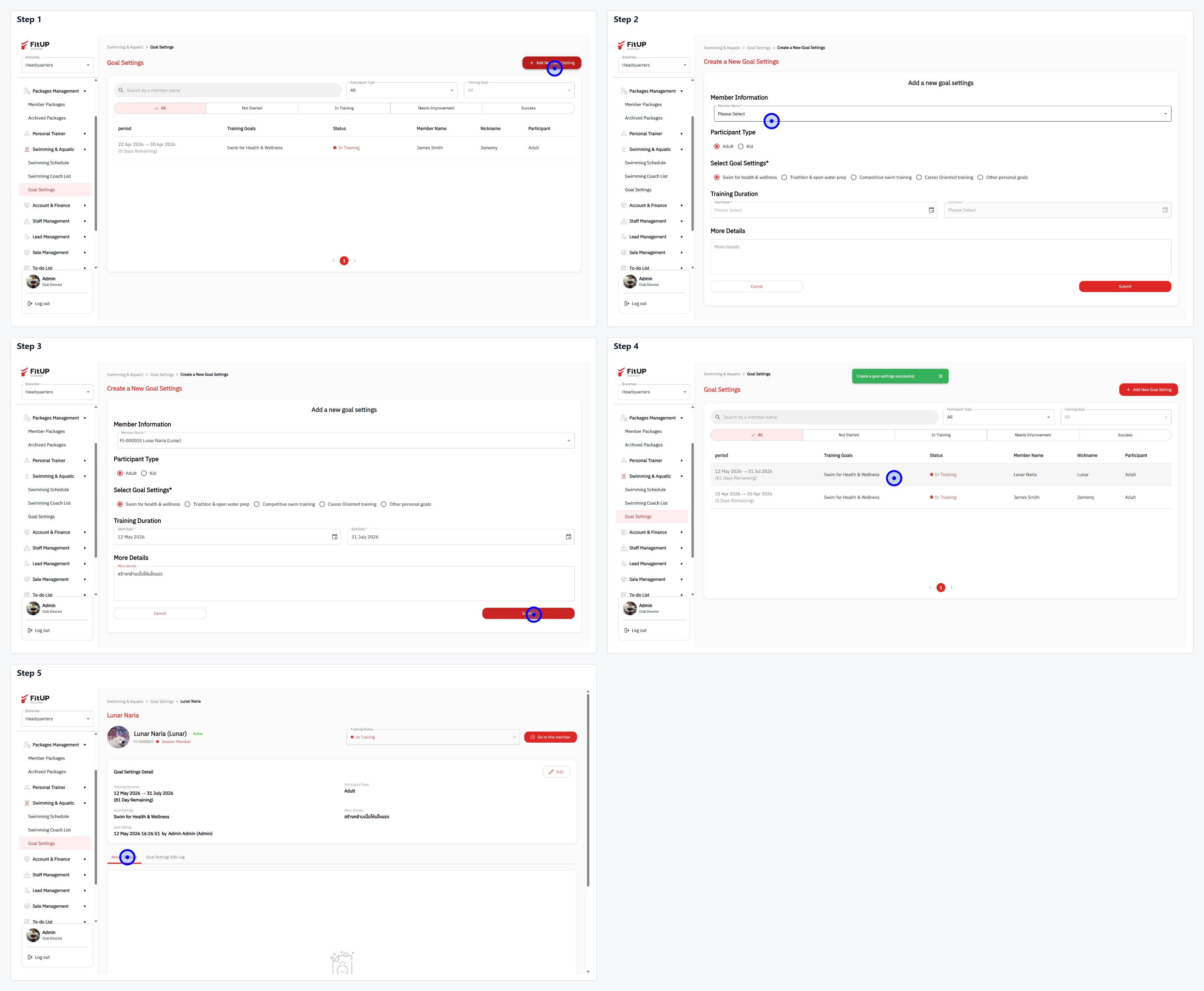 * คลิกเมนู **Swimming & Aquatic** จากนั้นเลือก **Goal Settings**
* คลิกปุ่ม **+ Add a New Goal Settings** ที่มุมขวาบน
* **Member Information**: เลือกสมาชิกจาก Dropdown
* **Participant Type**: เลือก Adult, Kid หรือ Both
* **Select Goal Settings**: เลือกเป้าหมายจาก Checkbox เช่น Health for health & wellness, Training & aqua poles, Competitive swim training หรือ Other personal goals
* **Training Duration**: กำหนดช่วงวันที่เริ่มต้นและสิ้นสุดการฝึก
* **More Details**: กรอกรายละเอียดเพิ่มเติม
* คลิกปุ่ม **Create** เพื่อบันทึก
* ระบบจะเพิ่ม Goal Settings ใหม่เข้าสู่รายการ และสามารถดูรายละเอียดได้จากโปรไฟล์นักเรียน
* คลิกเมนู **Swimming & Aquatic** จากนั้นเลือก **Goal Settings**
* คลิกปุ่ม **+ Add a New Goal Settings** ที่มุมขวาบน
* **Member Information**: เลือกสมาชิกจาก Dropdown
* **Participant Type**: เลือก Adult, Kid หรือ Both
* **Select Goal Settings**: เลือกเป้าหมายจาก Checkbox เช่น Health for health & wellness, Training & aqua poles, Competitive swim training หรือ Other personal goals
* **Training Duration**: กำหนดช่วงวันที่เริ่มต้นและสิ้นสุดการฝึก
* **More Details**: กรอกรายละเอียดเพิ่มเติม
* คลิกปุ่ม **Create** เพื่อบันทึก
* ระบบจะเพิ่ม Goal Settings ใหม่เข้าสู่รายการ และสามารถดูรายละเอียดได้จากโปรไฟล์นักเรียน