> ## Documentation Index
> Fetch the complete documentation index at: https://docs.fitup.health/llms.txt
> Use this file to discover all available pages before exploring further.
# วิธีจองสิ่งอำนวยความสะดวก กรณีไม่มีค่าใช้จ่าย (Facility Booking)
> จองสิ่งอำนวยความสะดวกแบบ Complimentary เช่น สระว่ายน้ำ ผ่าน LINE OA ฟิตเนส เลือกวันเวลาและยืนยันการจองได้ทันที
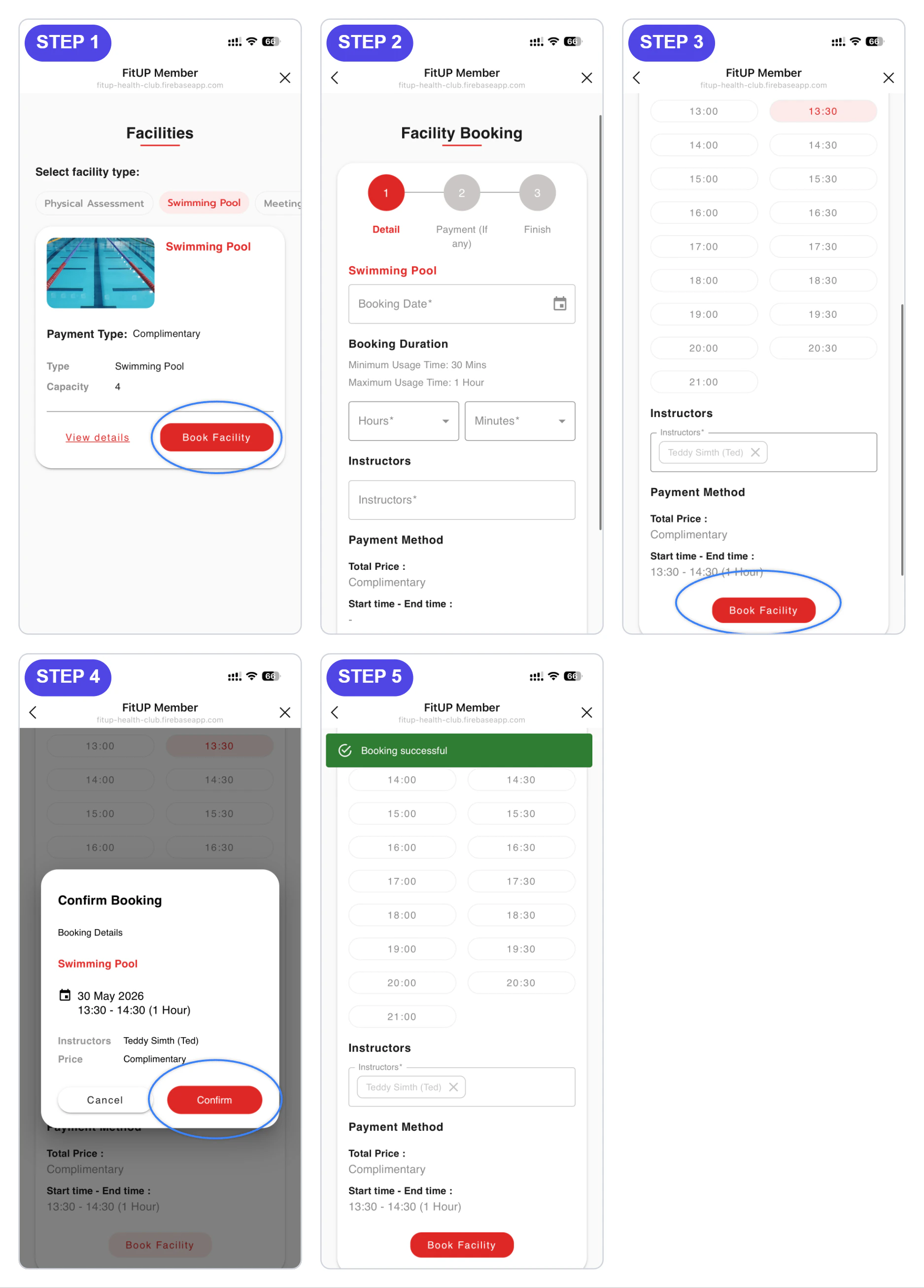 จากหน้า **Facilities** เลือกประเภทที่ต้องการ เช่น **Swimming Pool** ที่มี Payment Type เป็น **Complimentary** แล้วแตะปุ่ม **Book Facility**
ระบบจะแสดงหน้า **Facility Booking** ให้กรอกข้อมูล ได้แก่ วันที่จอง (Booking Date) ระยะเวลาการใช้งาน (Hours/Minutes) และชื่อผู้ดูแล (Instructors) จากนั้นเลือกเวลาเริ่มต้นที่ต้องการจากตารางเวลาที่แสดง แล้วกดปุ่ม **Book Facility**
ระบบจะแสดง pop-up **Confirm Booking** พร้อมสรุปรายละเอียด ได้แก่ ชื่อสิ่งอำนวยความสะดวก วันเวลา ผู้ดูแล และราคา (Complimentary) กดปุ่ม **Confirm** เพื่อยืนยัน เมื่อสำเร็จ ระบบจะแสดงข้อความ **Booking successful**
จากหน้า **Facilities** เลือกประเภทที่ต้องการ เช่น **Swimming Pool** ที่มี Payment Type เป็น **Complimentary** แล้วแตะปุ่ม **Book Facility**
ระบบจะแสดงหน้า **Facility Booking** ให้กรอกข้อมูล ได้แก่ วันที่จอง (Booking Date) ระยะเวลาการใช้งาน (Hours/Minutes) และชื่อผู้ดูแล (Instructors) จากนั้นเลือกเวลาเริ่มต้นที่ต้องการจากตารางเวลาที่แสดง แล้วกดปุ่ม **Book Facility**
ระบบจะแสดง pop-up **Confirm Booking** พร้อมสรุปรายละเอียด ได้แก่ ชื่อสิ่งอำนวยความสะดวก วันเวลา ผู้ดูแล และราคา (Complimentary) กดปุ่ม **Confirm** เพื่อยืนยัน เมื่อสำเร็จ ระบบจะแสดงข้อความ **Booking successful**