> ## Documentation Index
> Fetch the complete documentation index at: https://docs.fitup.health/llms.txt
> Use this file to discover all available pages before exploring further.
# วิธีออกจากระบบผ่าน LINE OA ฟิตเนส (User Logout)
> ออกจากระบบแอปสมาชิก FitUP ได้อย่างปลอดภัย และสามารถเข้าสู่ระบบใหม่ได้ตลอดเวลาผ่านเบอร์โทรศัพท์
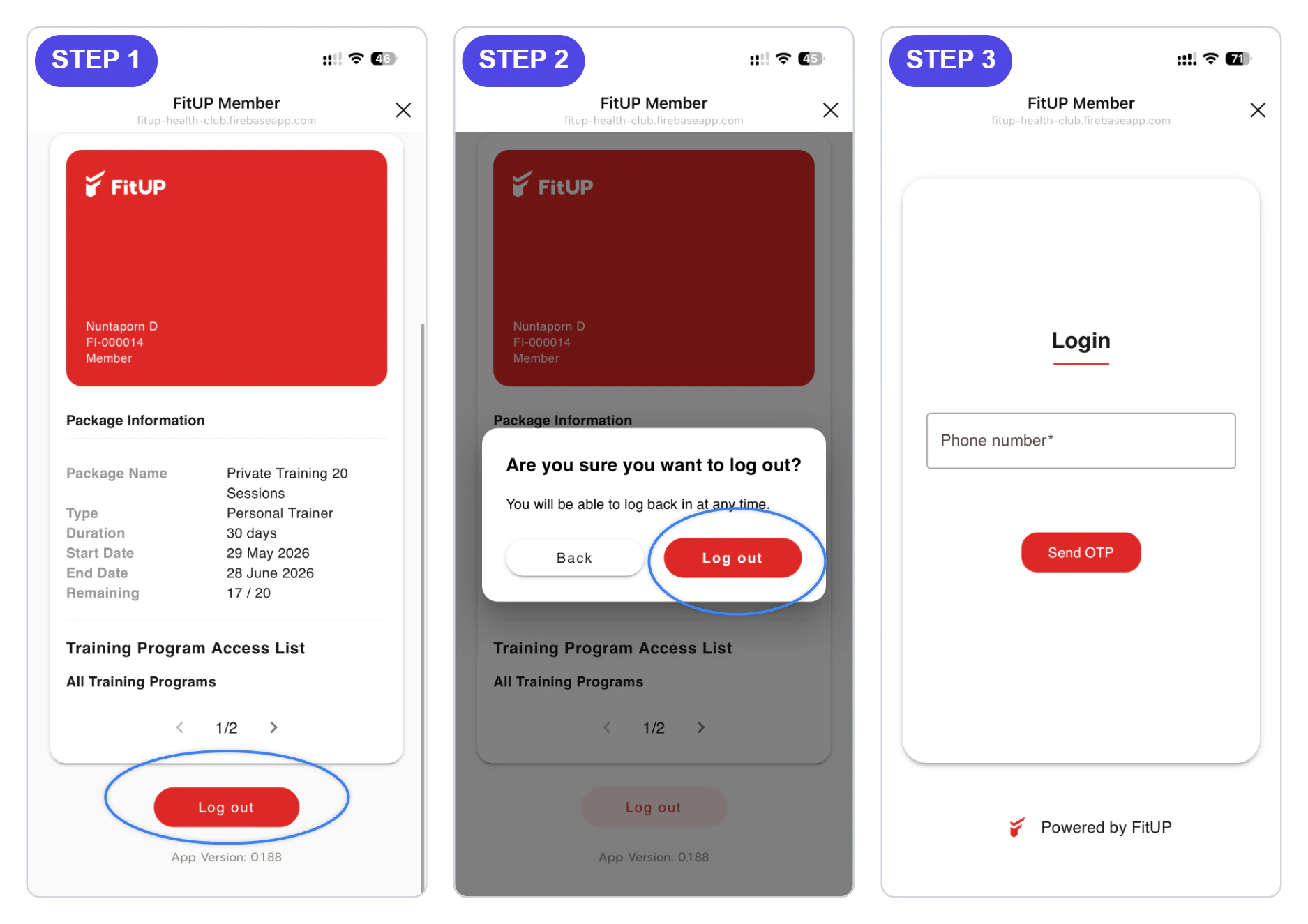 ในหน้า **Member** เลื่อนลงจนถึงด้านล่างสุด แล้วแตะปุ่ม **Log out**
ระบบจะแสดง pop-up **Are you sure you want to log out?** กดปุ่ม **Log out** เพื่อยืนยัน ระบบจะกลับไปยังหน้า **Login** พร้อมให้เข้าสู่ระบบใหม่ได้ทันที
ในหน้า **Member** เลื่อนลงจนถึงด้านล่างสุด แล้วแตะปุ่ม **Log out**
ระบบจะแสดง pop-up **Are you sure you want to log out?** กดปุ่ม **Log out** เพื่อยืนยัน ระบบจะกลับไปยังหน้า **Login** พร้อมให้เข้าสู่ระบบใหม่ได้ทันที