> ## Documentation Index
> Fetch the complete documentation index at: https://docs.fitup.health/llms.txt
> Use this file to discover all available pages before exploring further.
# วิธีตั้งเป้าหมายการเทรนให้สมาชิก (Add Goal Settings)
> วิธีสร้างเป้าหมายการเทรนให้สมาชิกในแอป FitUP Trainer กำหนด Training Type เป้าหมาย และระยะเวลาการเทรนได้อย่างเป็นระบบ
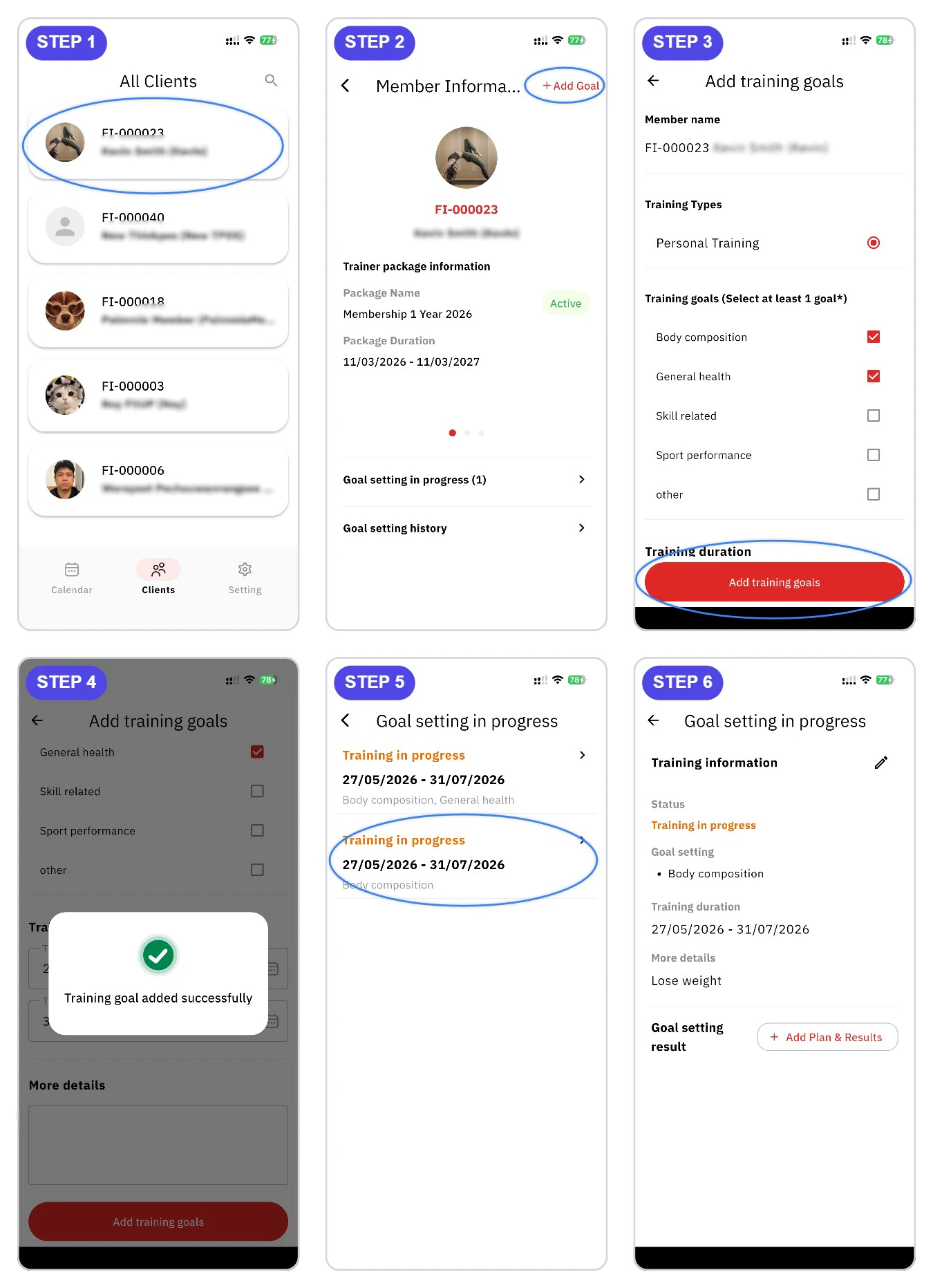 แตะเมนู **Clients** ที่แถบด้านล่าง ระบบจะแสดงรายชื่อสมาชิกทั้งหมด เลือกสมาชิกที่ต้องการตั้งเป้าหมายการเทรน
ในหน้า **Member Information** ของสมาชิก กดปุ่ม **+ Add Goal** ที่มุมขวาบนของหน้าจอ
กรอกข้อมูลในหน้า **Add training goals** ดังนี้
* **Training Types** — เลือกประเภทการเทรน เช่น Personal Training
* **Training goals** — เลือกเป้าหมาย (เลือกได้มากกว่า 1 ข้อ) เช่น Body composition, General health, Skill related, Sport performance, Other
* **Training duration** — ระบุวันเริ่มต้นและวันสิ้นสุด
* **More details** — รายละเอียดเพิ่มเติม (ถ้ามี)
จากนั้นกดปุ่ม **Add training goals**
ระบบจะแสดงข้อความ **Training goal added successfully** หมายความว่าบันทึกสำเร็จ เป้าหมายจะปรากฏใน **Goal setting in progress** กดเข้าไปดูรายละเอียดได้ ประกอบด้วย Training information, สถานะ, เป้าหมาย, ระยะเวลา และปุ่ม **Add Plan & Results** สำหรับเพิ่มแผนการเทรนต่อไป
แตะเมนู **Clients** ที่แถบด้านล่าง ระบบจะแสดงรายชื่อสมาชิกทั้งหมด เลือกสมาชิกที่ต้องการตั้งเป้าหมายการเทรน
ในหน้า **Member Information** ของสมาชิก กดปุ่ม **+ Add Goal** ที่มุมขวาบนของหน้าจอ
กรอกข้อมูลในหน้า **Add training goals** ดังนี้
* **Training Types** — เลือกประเภทการเทรน เช่น Personal Training
* **Training goals** — เลือกเป้าหมาย (เลือกได้มากกว่า 1 ข้อ) เช่น Body composition, General health, Skill related, Sport performance, Other
* **Training duration** — ระบุวันเริ่มต้นและวันสิ้นสุด
* **More details** — รายละเอียดเพิ่มเติม (ถ้ามี)
จากนั้นกดปุ่ม **Add training goals**
ระบบจะแสดงข้อความ **Training goal added successfully** หมายความว่าบันทึกสำเร็จ เป้าหมายจะปรากฏใน **Goal setting in progress** กดเข้าไปดูรายละเอียดได้ ประกอบด้วย Training information, สถานะ, เป้าหมาย, ระยะเวลา และปุ่ม **Add Plan & Results** สำหรับเพิ่มแผนการเทรนต่อไป