> ## Documentation Index
> Fetch the complete documentation index at: https://docs.fitup.health/llms.txt
> Use this file to discover all available pages before exploring further.
# วิธีบันทึกผลการเทรนและส่งสรุปให้สมาชิก (Add Result Summary)
> วิธีบันทึกผลการเทรนจริง (Actual Result) และส่งสรุปผลให้สมาชิกในแอป FitUP Trainer ครอบคลุม Body Composition, Strength Level และรูปภาพ
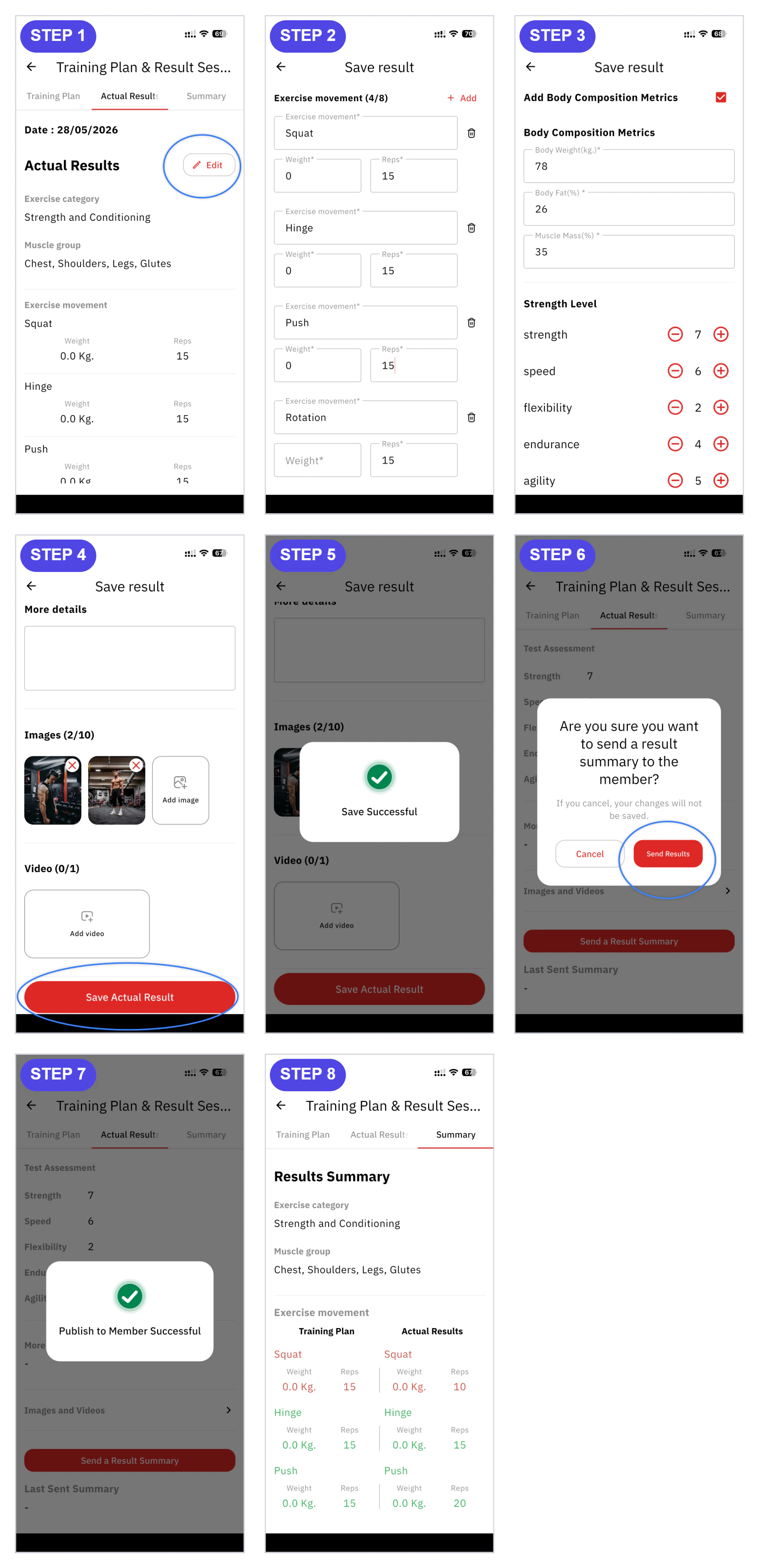 ในหน้า **Training Plan & Result Sessions** แตะแท็บ **Actual Result** จากนั้นกดไอคอน **Edit (ดินสอ)** ที่มุมขวาบนเพื่อเริ่มกรอกผลการเทรนจริง
กรอกข้อมูลในฟอร์ม **Save result** ให้ครบถ้วน
* **Exercise movement** — ชื่อท่า น้ำหนัก (Weight) และจำนวนครั้ง (Reps) จริงที่ทำได้ กดปุ่ม **+ Add** เพื่อเพิ่มท่าออกกำลังกาย
* **Body Composition Metrics** — น้ำหนักตัว (Body Weight), ไขมัน (Body Fat%), กล้ามเนื้อ (Muscle Mass%)
* **Strength Level** — ระดับ strength, speed, flexibility, endurance, agility ของสมาชิก
* **More details** — หมายเหตุเพิ่มเติมหรือคำแนะนำ
เพิ่มรูปภาพประกอบ (รองรับสูงสุด 10 รูป) หรือวิดีโอ (รองรับ 1 คลิป) เพื่อประกอบการสรุปผล จากนั้นกดปุ่ม **Save Actual Result** ระบบจะแสดงข้อความ **Save Successful**
กดปุ่ม **Send a Result Summary** เพื่อส่งสรุปผลให้สมาชิก ระบบจะแสดงกล่องยืนยัน "Are you sure you want to send a result summary to the member?" กด **Send Results** เพื่อยืนยัน ระบบจะแสดงข้อความ **Publish to Member Successful** = ส่งสรุปให้สมาชิกสำเร็จ ตรวจสอบผลเปรียบเทียบระหว่าง Training Plan และ Actual Results ได้ในแท็บ **Summary**
ในหน้า **Training Plan & Result Sessions** แตะแท็บ **Actual Result** จากนั้นกดไอคอน **Edit (ดินสอ)** ที่มุมขวาบนเพื่อเริ่มกรอกผลการเทรนจริง
กรอกข้อมูลในฟอร์ม **Save result** ให้ครบถ้วน
* **Exercise movement** — ชื่อท่า น้ำหนัก (Weight) และจำนวนครั้ง (Reps) จริงที่ทำได้ กดปุ่ม **+ Add** เพื่อเพิ่มท่าออกกำลังกาย
* **Body Composition Metrics** — น้ำหนักตัว (Body Weight), ไขมัน (Body Fat%), กล้ามเนื้อ (Muscle Mass%)
* **Strength Level** — ระดับ strength, speed, flexibility, endurance, agility ของสมาชิก
* **More details** — หมายเหตุเพิ่มเติมหรือคำแนะนำ
เพิ่มรูปภาพประกอบ (รองรับสูงสุด 10 รูป) หรือวิดีโอ (รองรับ 1 คลิป) เพื่อประกอบการสรุปผล จากนั้นกดปุ่ม **Save Actual Result** ระบบจะแสดงข้อความ **Save Successful**
กดปุ่ม **Send a Result Summary** เพื่อส่งสรุปผลให้สมาชิก ระบบจะแสดงกล่องยืนยัน "Are you sure you want to send a result summary to the member?" กด **Send Results** เพื่อยืนยัน ระบบจะแสดงข้อความ **Publish to Member Successful** = ส่งสรุปให้สมาชิกสำเร็จ ตรวจสอบผลเปรียบเทียบระหว่าง Training Plan และ Actual Results ได้ในแท็บ **Summary**