

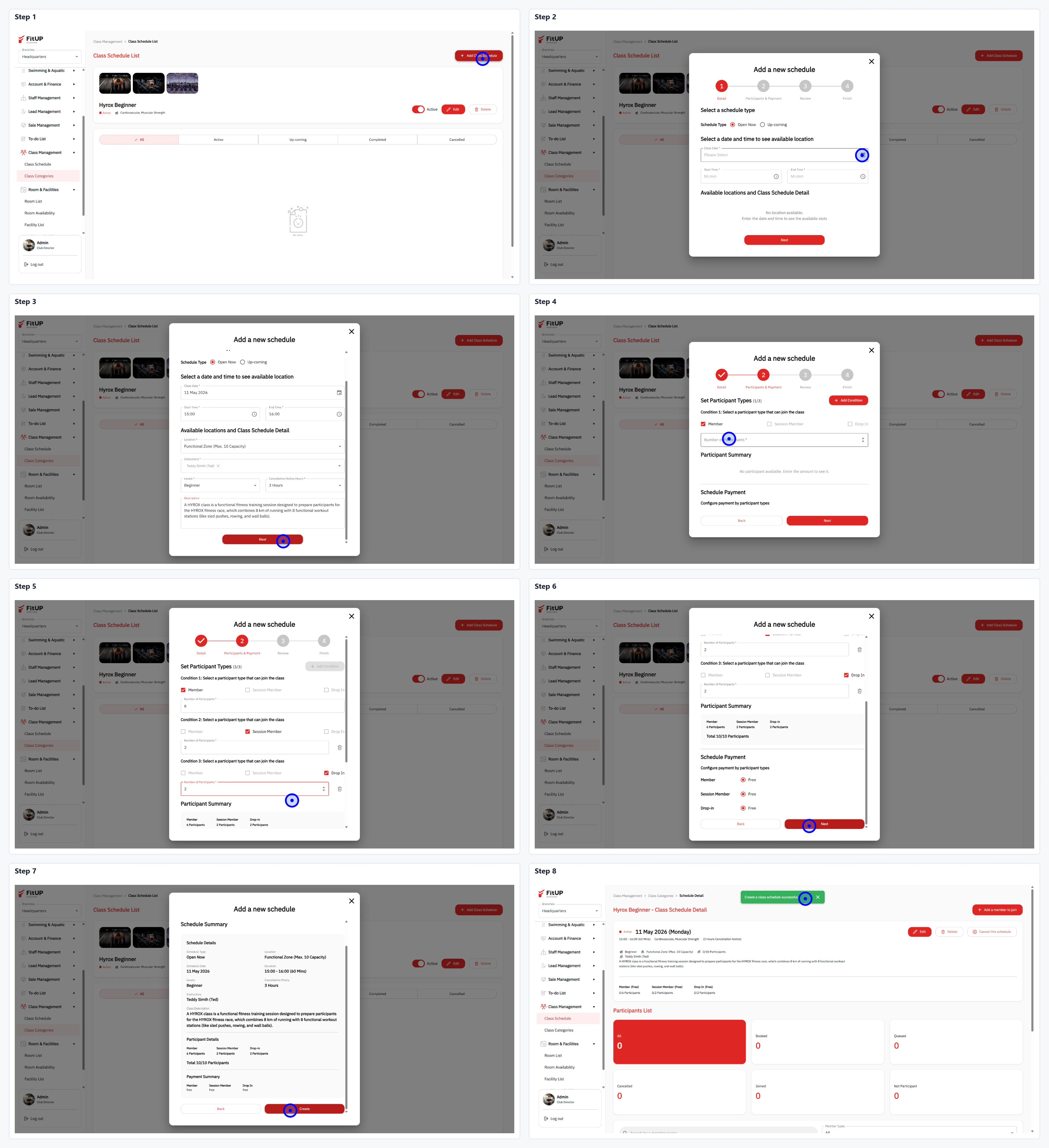
ขั้นตอนที่ 1: เปิดหน้า Class Schedule List และเพิ่มตารางใหม่
- คลิกที่ชื่อคลาสใน Class Categories เพื่อเข้า Class Schedule List
- คลิกปุ่ม + Add New Schedule ที่มุมขวาบน
ขั้นตอนที่ 2: เลือกประเภทตารางและกำหนดวัน-เวลา
- เลือกประเภทตาราง เช่น All Day หรือ Custom Time
- เลือกวันที่และกำหนดเวลาเริ่มต้น-สิ้นสุดของคลาส
ขั้นตอนที่ 3: ตั้งค่าผู้เข้าร่วมและการชำระเงิน
- กำหนด Participant Types และจำนวนที่รับในแต่ละประเภท
- ตั้งค่าส่วน Facilitate Payment หากต้องการเก็บค่าใช้จ่าย และเลือกห้องกับเทรนเนอร์