

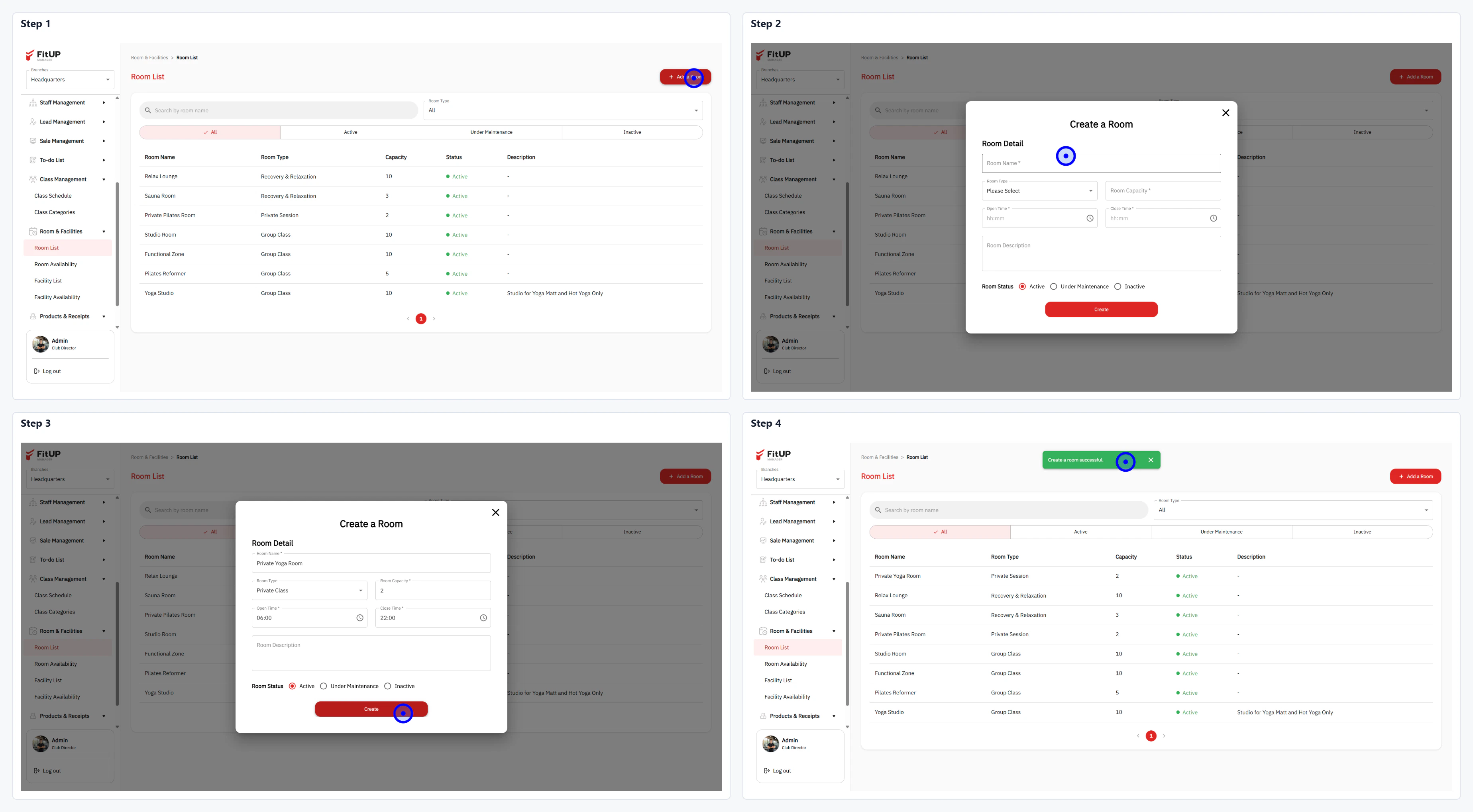
ขั้นตอนที่ 1: เข้าสู่เมนูรายการห้องและเพิ่มห้องใหม่
- คลิกเมนู Room & Facilities จากนั้นเลือก Room List
- ระบบจะแสดงรายการห้องทั้งหมด พร้อมข้อมูล ประเภท ความจุ และสถานะ
- คลิกปุ่ม + Add Room ที่มุมขวาบน
ขั้นตอนที่ 2: กรอกข้อมูลห้องและตั้งค่าสถานะ
- กรอกชื่อห้องใน Room Name และเลือกประเภทใน Room Type เช่น Private Class หรือ Group Class
- ระบุจำนวนความจุใน Room Capacity และกำหนดช่วงเวลาใน Min / Max
- กรอกรายละเอียดห้องใน Room Description (ถ้ามี)
- เลือก Room Status: Active, Under Maintenance หรือ Inactive