

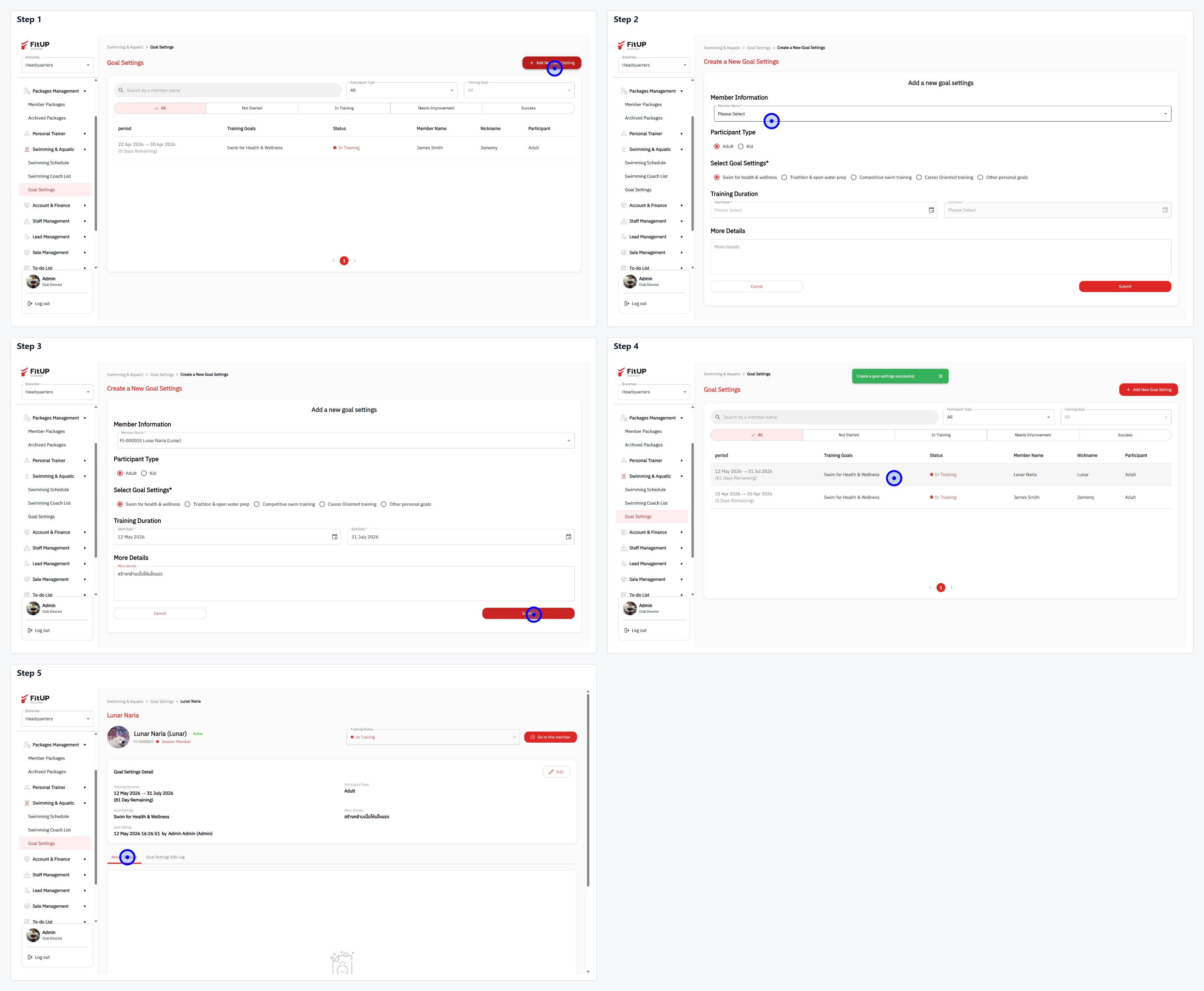
ขั้นตอนที่ 1: เข้าสู่เมนู Goal Settings และเพิ่มเป้าหมายใหม่
- คลิกเมนู Swimming & Aquatic จากนั้นเลือก Goal Settings
- คลิกปุ่ม + Add a New Goal Settings ที่มุมขวาบน
ขั้นตอนที่ 2: กรอกข้อมูลในแบบฟอร์ม Add a new goal settings
- Member Information: เลือกสมาชิกจาก Dropdown
- Participant Type: เลือก Adult, Kid หรือ Both
- Select Goal Settings: เลือกเป้าหมายจาก Checkbox เช่น Health for health & wellness, Training & aqua poles, Competitive swim training หรือ Other personal goals
- Training Duration: กำหนดช่วงวันที่เริ่มต้นและสิ้นสุดการฝึก
- More Details: กรอกรายละเอียดเพิ่มเติม